
A function in Mojo is a reusable block of code that performs a specific task in our project. You can define a function once and call it whenever you need it, so you don’t need to write the same code repeatedly. This method makes your code cleaner, shorter, and easier to debug or update.
Mojo provides the “fn” keyword to define a function, which is similar to Rust and other statically typed languages.
Syntax of a Function in Mojo
fn function_name(arg1: Type, arg2: Type) -> ReturnType:
    # function body
    return value
- fn: This keyword define a function
- function_name: This is the name of your function
- (arg1: Type, . . .): It is an input parameter.
- -> ReturnType: specifies what type of data the function returns
Mojo Function Example
This basic example adds two numbers:
fn add_numbers(a: Int, b: Int) -> Int:
    return a + b

print("Sum is:", add_numbers(10, 5))
Output:
Sum is: 15
Real-Life Example: Calculate Bill with Tax
fn calculate_total_bill(amount: Float, tax_percent: Float) -> Float:
    let tax = (amount * tax_percent) / 100
    return amount + tax

let total = calculate_total_bill(500.0, 18.0)
print("Total Bill with Tax:", total)
Output:
Total Bill with Tax: 590.0
This logic is perfect for billing systems or POS machines.
Mojo Functions with Conditional Logic (if/else)
We can add conditions in a function to check whether a value is true or false.
Here the simple example of conditional logic:
fn check_even_odd(num: Int) -> String:
    if num % 2 == 0:
        return "Even"
    else:
        return "Odd"

print("Number 7 is:", check_even_odd(7))
Output:
Number 7 is: Odd
Currently, Mojo doesn’t support optional and default parameters like Python, but when it’s available, it will allow writing more flexible functions.
Function with List/Array Input
Calculate the Average Temperature from a List of Readings:
fn average_temp(temps: List[Float]) -> Float:
    var total: Float = 0.0
    for t in temps:
        total += t
    return total / len(temps)

let readings = [29.5, 30.2, 28.9, 31.0]
print("Average Temperature:", average_temp(readings))
Final Output:
Let’s calculate manually:
Total = 29.5 + 30.2 + 28.9 + 31.0 = 119.6
Average = 119.6 / 4 = 29.9
Average Temperature: 29.9
This program calculates the average temperature from a list of numbers and prints the result.
Why Use Functions in Mojo?
- It helps for code reusability, write once and use many times.
- We can break the task into small, manageable blocks for clean coding.
- It improves readability and understanding.
- Easier to test individual parts of code.
Smart Plant Watering Reminder Project
Create a Mojo program that:
- Takes a list of daily soil moisture levels (in percentage).
- Uses a function to check if the plant needs watering.
- Uses a loop to go through the week’s moisture readings.
- Uses if-else inside the function to decide:
- If moisture is below 30%, it should say “Water the plant”.
- If moisture is between 30% and 70%, it should say “Plant is healthy”.
- If above 70%, it should say “Soil is too wet, don’t water”.
- If moisture is below 10%, issue a warning and break the loop.
Mojo Code: Smart Plant Watering Reminder
fn check_soil_moisture(level: Int) -> String:
    if level < 10:
        return "Critical! Soil too dry. Sensor may be faulty or soil needs urgent watering."
    elif level < 30:
        return "Water the plant."
    elif level <= 70:
        return "Plant is healthy."
    else:
        return "Too wet, skip watering."

fn main():
    var moisture_readings = [45, 28, 65, 8, 72, 55, 30]  # Daily moisture % of the week

    for reading in moisture_readings:
        if reading < 10:
            print("Day Moisture:", reading, "%")
            print(check_soil_moisture(reading))
            print("Stopping checks for safety.")
            break
        else:
            print("Day Moisture:", reading, "%")
            print(check_soil_moisture(reading))
Output:
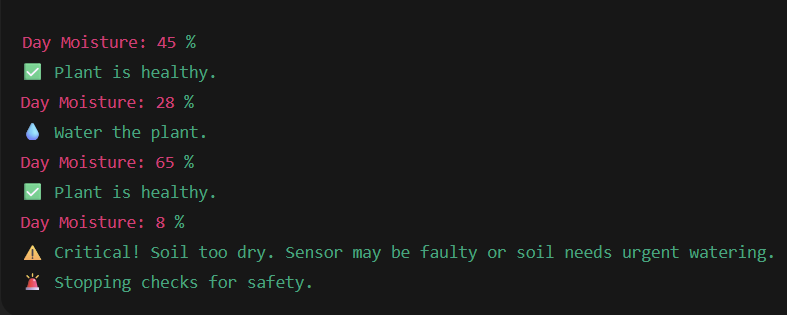
In this code, we have use functions with conditional statements like if, elif, and else for choose a current temperatures.
Student Exercise For Practice
Your Task:
Create a function in Mojo called grade_student that accepts a student’s score and returns:
- “Pass” if score ≥ 40
- “Fail” if score < 40
Code Logic:
fn grade_student(score: Int) -> String:
    if score >= 40:
        return "Pass"
    else:
        return "Fail"

print("Student Result:", grade_student(55))  # Output: Pass
Try it yourself and build your coding logic.